
Goals
- Build a minimalist, lightweight RAG engine using a Ollama server.
- Understand the core building blocks: file scanning, incremental vector indexing, dynamic top-k retrieval, persona-driven prompt engineering, and streaming LLM responses.
Introduction
Setting up a custom Knowledge Base (RAG) doesn’t require complex orchestration frameworks or heavy cloud infrastructures. With a clean Python codebase, LanceDB (an embedded, disk-backed vector store), and Ollama running locally, you can spin up an end-to-end, privacy-first knowledge engine in minutes.
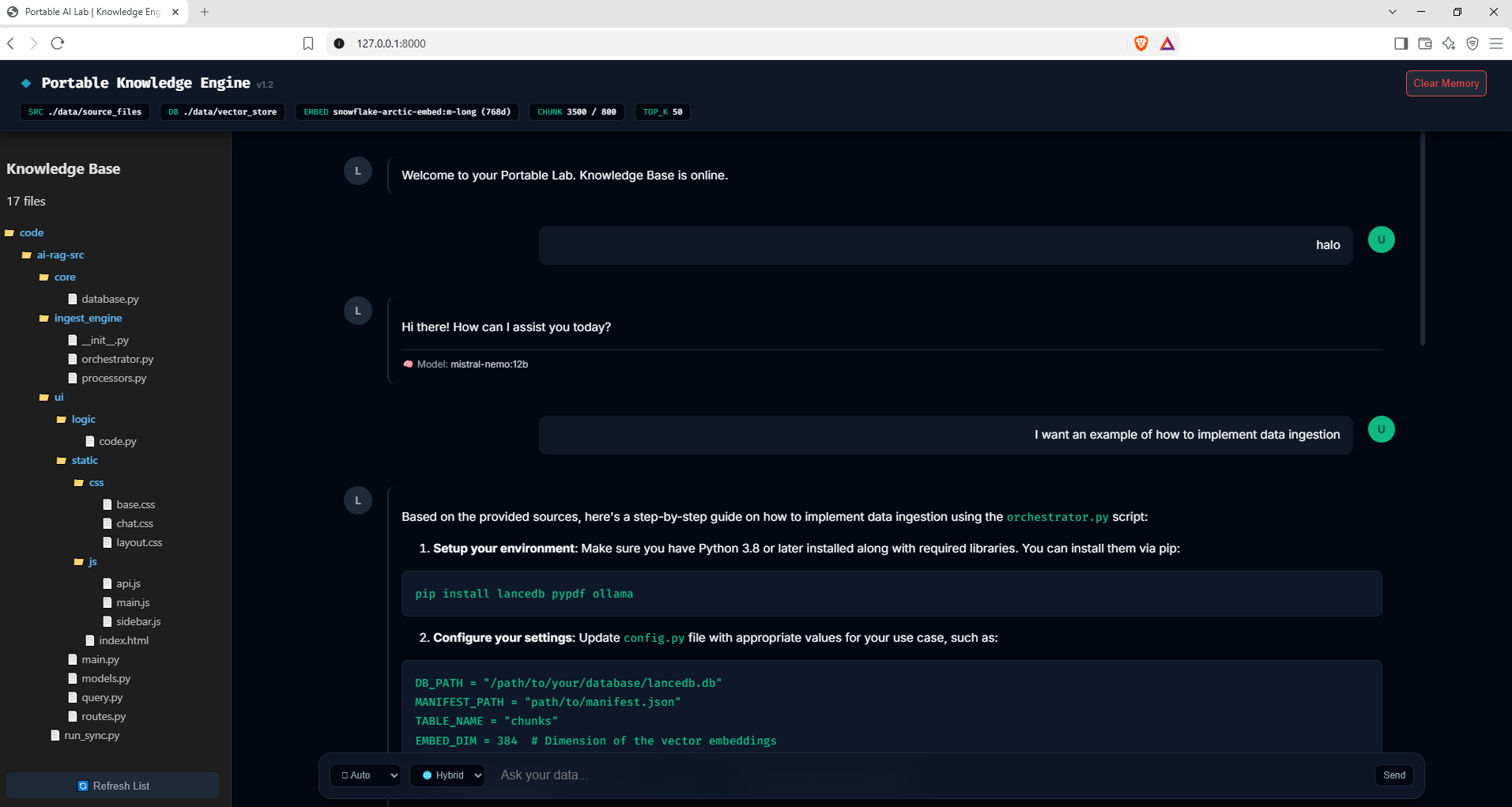
The web interface in the following project is designed for real-time control over the engine’s state:
- Clear Cache Memory: A direct action (
POST /reset) that purges the LanceDB vector store and deletes themanifest.json. This gives you a blank slate if you need to drastically change chunking parameters or clear corrupted states. - On-Demand Sync: You can run the ingestion sync manually at any time to instantly process file additions, deletions, or edits, ensuring the database stays perfectly aligned with your local workspace.
- Sidebar Tree View: A visual inventory (
GET /indexed-files) maps out exactly which source files have been ingested and are actively serving as context for the model.
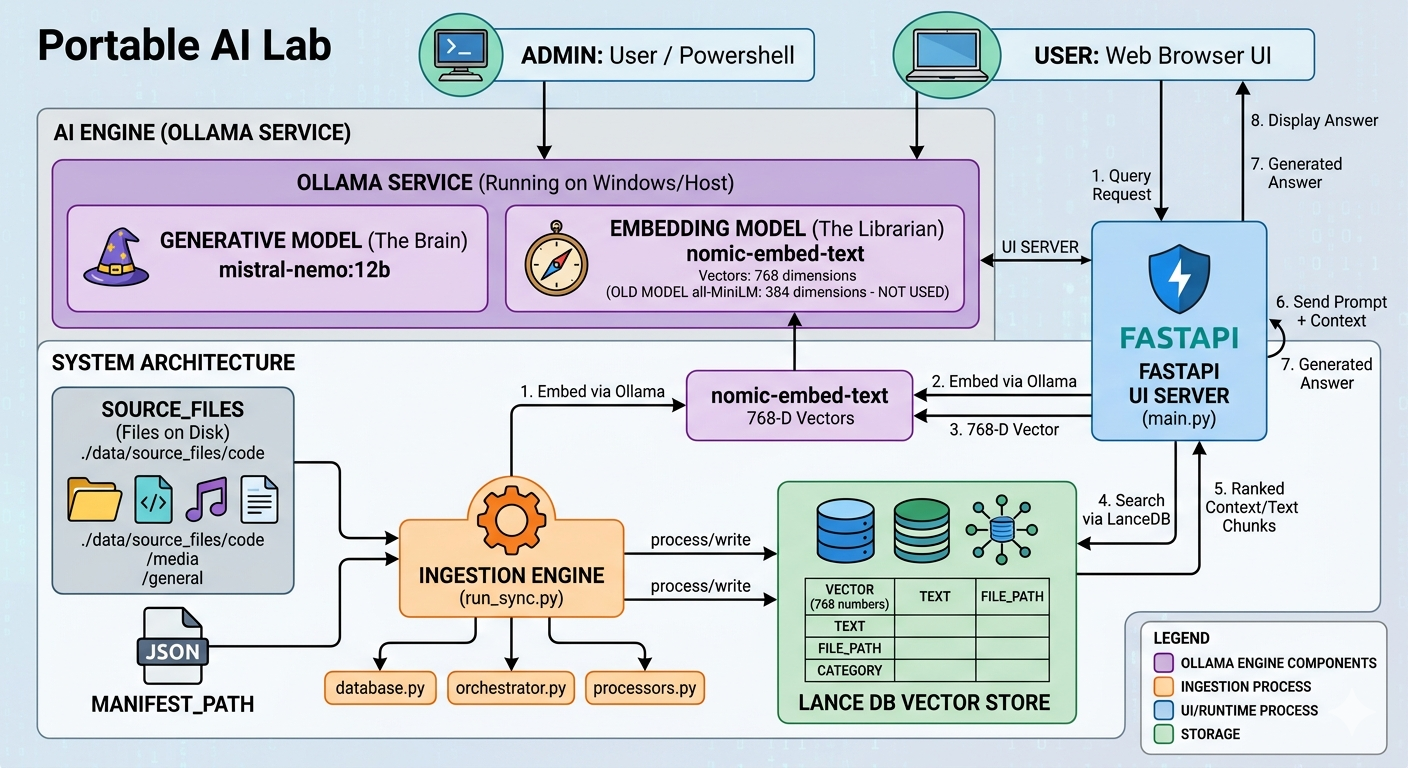
The following is an overview of the system architecture:
⚠️ Important: Hardware & Memory Warning
Baseline Hardware: The default configuration provided in this project is tuned for machines with at least 16GB of VRAM/RAM.
Running large context windows, high retrieval counts, and embedding models simultaneously can quickly consume your system memory.
If you are running on a machine with 8GB or 12GB RAM/VRAM, update your configuration settings to avoid freezing your machine:
- Lower
CHUNK_SIZEandCHUNK_OVERLAP. - Lower retrieval thresholds.
- Use lightweight Ollama models for embeddings and generation.
Source Code
Source code for the portable AI service:
- Knowledge Base Engine Source: https://github.com/a-naitslimane/anaitslimane.article.portable-ai-rag
Setup
Follow these steps to set up the engine on your machine.
Step 1: Install and Launch Ollama
Ollama acts as the local inference server for vector embeddings and LLM generation across macOS, Linux, and Windows.
-
Download & Install:
- macOS / Windows: Download the installer from ollama.com/download .
- Linux: Run the official install script:
curl -fsSL https://ollama.com/install.sh | sh
-
Start the Ollama Engine:
- On macOS / Windows, launching the installed app starts the service automatically in your system tray.
- On Linux, start the daemon manually:
ollama serve
(Note: Model downloading and configuration are handled dynamically during execution, so no manual pull steps are required.)
Step 2: Set Up Python Environment & Install Dependencies
Clone the repository, create a virtual environment, and install requirements:
On Windows (PowerShell):
python -m venv venv
.\venv\Scripts\Activate.ps1
pip install -r requirements.txt
On Linux / macOS:
python3 -m venv venv
source venv/bin/activate
pip install -r requirements.txt
Step 3: Add Source Documents
Copy your projects source code, documentation, or reference materials inside ./data/source_files/.
Step 4: Sync Vector Database & Start Server
-
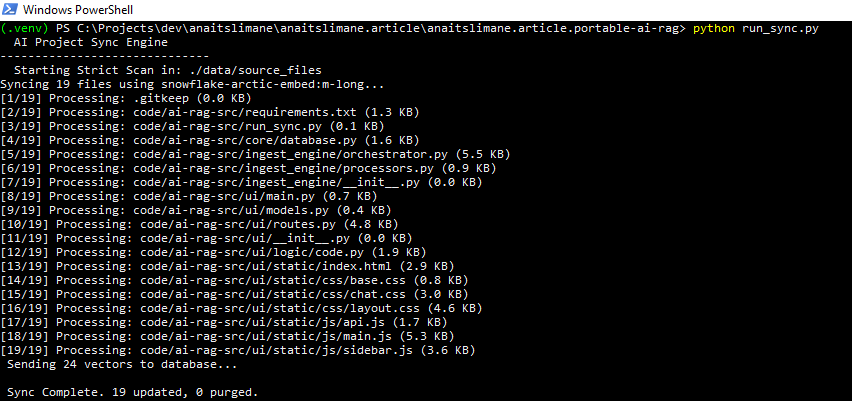
Run the Ingestion Pipeline:
python run_sync.pyHere is the ingestion console in action:
-
Launch the API & UI Server:
uvicorn ui.main:app --reload
Open http://localhost:8000 in your browser to interact with your Knowledge Base.
Here is the interface in action:
Implementation Details (Codebase Architecture)
This specific knowledge engine implements the RAG pattern entirely locally, coordinating the flow through targeted Python modules:
1. The Ingestion Pipeline
- Discovery & Filtering (
scanner.py&orchestrator.py): The system recursively scans the source directory. It intelligently skips directories likenode_modulesand filters out lock files, minified code, or large binaries. Aningestion_manifest.jsontracks file modification timestamps (mtime) so that subsequent syncs are incremental—only processing new or modified files. - Parsing & Chunking (
processors.py&chunker.py): Supported files (PDFs, Markdown, raw code) are parsed into plain text. The text is split into overlapping windows to ensure no context is lost at the boundaries. - Embedding & Storage (
embedder.py,vectors.py,database.py): Chunks are sent to Ollama to generate embeddings. The vectors undergo L2 normalization to ensure accurate distance calculations before being upserted into LanceDB via batch operations.
2. The Query Pipeline (query.py & routes.py)
- Intent Classification: Before hitting the database, the prompt is evaluated by Ollama using a JSON-formatted classifier to detect conversational intent (e.g., “hello”, “thanks”). If detected, vector search is bypassed to save resources.
- Dynamic Search Expansion (
code.py): If the query involves structural analysis (e.g., asking for an entire class or architecture), the system dynamically increases the retrieval limits to capture broader context. - Normalized Retrieval & Distance Filtering: Query embeddings are normalized and matched against LanceDB. A strict distance threshold ensures only highly relevant chunks are retrieved, avoiding “hallucinations” caused by feeding unrelated text to the model.
- Persona & Prompt Systems (
personas.py,prompts.py): Retrieved context is wrapped into specialized system prompts based on the selected persona (code,doc, orauto). The prompt explicitly instructs the LLM to ground its response in the provided context. - Streaming Response: The final generation streams back to the UI in real time using Server-Sent Events (SSE) via FastAPI.
3. Tuning Quality & Relevance (Configuration Parameters)
Every aspect of retrieval quality can be controlled via config.py and the UI parameters:
CHUNK_SIZE&CHUNK_OVERLAP: Larger chunks provide more context to the LLM but dilute specific details and consume context window limits rapidly. Smaller, overlapping chunks ensure precise retrieval but might cut off code blocks mid-function.TOP_K(Recall): Determines how many chunks are initially retrieved. Higher values capture more information but increase memory usage and processing time.DISTANCE_THRESHOLD(Precision): Sets the maximum vector distance allowed. Lowering this value acts as a strict filter—only chunks semantically identical to the query are accepted.- Personas (
code,doc,auto): Tailors the LLM’s behavioral instructions. Thecodepersona forces strict output formatting for programming syntax, whiledocis optimized for explanatory prose. - Mode (
strictvs.hybrid): Dictates how the LLM treats missing context. Instrictmode, the model will refuse to answer if the answer isn’t in the database.hybridmode allows the model to fall back on its general knowledge.
Troubleshooting
- Ollama Unreachable: Ensure Ollama service is active (
ollama serve). Model management happens dynamically during execution. - Database Uninitialized: Requesting
/queryon an empty vector store triggers aDatabaseEmptyError. Executepython run_sync.pyto build the initial index.
Wrapping Up
By combining FastAPI, LanceDB, and Ollama, you get a clear, highly maintainable RAG architecture where you control every line of code—from chunking strategies to streaming logic.
🏛️ The Architect’s Final Note: Scaling to Cloud
While this setup is optimized for local execution, moving it to a cloud-hosted environment is straightforward (although not advised because of its low performance regarding requests concurrency):
- Storage Decoupling: LanceDB natively supports cloud object storage. You can change
DB_PATHinconfig.pyfrom a local path (./data/vector_store) to an AWS S3 or MinIO URI (s3://my-rag-bucket/vector_store), eliminating local disk dependency. - Model Offloading: Instead of running Ollama on the application server, point
AsyncClientinroutes.pyto a dedicated GPU instance or an inference service running vLLM or TGI. - Stateless API Scaling: Package the UI into a lightweight Docker container (
python:3.12-slim). Because vector storage can reside in S3 and model inference on GPU nodes, your UI/API layer becomes fully stateless and horizontally scalable behind a reverse proxy or load balancer.